Reflection Blog Post

What was your favorite project(s) during the semester? Please explain why.

I liked the Illustrator Logo Project best, which was a surprise to me. I anticipated liking the Premier video project, but I had a lot of fun learning more about logos and creating my own. I think the readings for the at project were the most interesting, and I like having a logo I can use moving forward.

What skills did you learn in the course that you believe you will use in the future?

I think I will use all the skills I used. All four programs were very helpful, and skills I foreses using in my future. I think that PhotoShop and Premier will come up more often than Illustrator or Audition, but all were worthwhile.

What coursework or career path do you see in your future? What skills or projects from this class may be influential in your chosen career path?

I am currently an international education professional, and I see myself staying in this career path in the future. I do think that the skills I learned in this course will be very helpful in this profession. I anticipate using Adobe PhotoShop, Illustrator, and Premier to help create study abroad marketing materials. Currently I feel limited by the materials others create for me so I am excited to try my new skills and develop materials that I think will be more fun and engaging for students.

Is there any skill that you wished you would have learned in this course that you did not learn? If yes, what skill is that?

I really did not have many preconceptions about what I would learn in this course, and I think that what I did learn easily surpassed those preconceptions. I don’t think there is anything I wish I had learned that I did not. I do think that there is still a lot I need to learn in order to master each program, but I now feel comfortable enough to continue learning more on my own.

Did you find any websites or resources from outside the class material that were especially useful?

Learning about creative commons was very helpful. That is not something I really knew much about previously, and I was always afraid to use anything because I was not familiar with the laws and what I could and could not use. I appreciate all the links to creative commons sites I can use in the future.

If you have any other thoughts, comments, suggestions, etc., please feel free to add them to your post.

Really loved the hybrid online instruction with course labs and virtual labs. Very helpful style for those of us who work full time. I did have to be much more self motivated than in a normal in-person style class, which was sometimes challenging. But overall I think this style was really beneficial for me. I liked being able to complete the assignments at a time that worked for me, and I also liked that all the materials covered in class were available online to go back and review at any time. This was probably the biggest benefit for me as opposed to taking a totally in-person course. I wasn’t constantly trying to take notes and write down everything that was said because I knew I could re-read or re-watch the content at any point.
Final Video Story

Idea and Inspiration

For this project I decided to show a video of what a minimalist suitcase packing experience might look like, which relates to my overall travel theme. I believe that packing light is a skill that many people have not yet mastered, but one that exponentially makes travel easier and travelers happier. I have watched a lot of different packing videos over the years, and that is where I got the idea. I also talk about packing tips in my daily work, so I was influenced by this.

Design Process

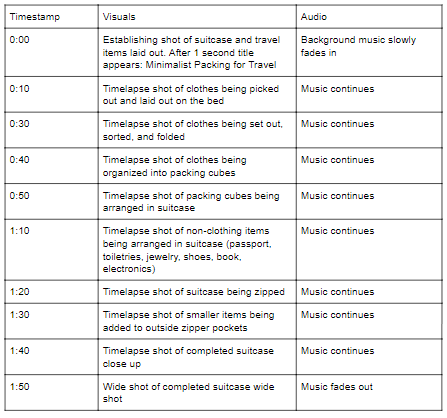
For most of the video I used either a time-lapse to speed up the packing process or an app called Stop Motion that that blends photos together using the jump cut method. The design starts from the beginning of the process, starting with the packing list, moving into pulling out everything that needs to be packed, folding everything, arranging them in packing cubes, etc.

Technical Detail

I used my own clothes, suitcase, and other travel items to create the video. It was all shot on my iphone with a small portable phone tripod. Other than the time-lapse and the jump cut I also included an establishing shot of the suitcase.

Feedback

The feedback I received was similar to the self-critique I made. We both agreed that for the final version I needed to add audio and a title. It was also suggested that I add words at the end of the video, and I also needed to add length. I did slow down most of the videos to make them more clear and less busy. I added a title, as well as a goodbye message in French at the end. Lastly I added a Chopin waltz to add a European feel.

Sources and Materials

The audio was found on a creative commons site, musopen.org. The waltz used is Chopin’s Waltz in A. minor, B. 150.

https://musopen.org/music/4406-waltz-in-a-minor-b-150/

Draft Video Story

Idea and Inspiration

For this project I decided to show a video of what a minimalist suitcase packing experience might look like, which relates to my overall travel theme.

Design Process

I was inspired by many other packing videos I’ve seen over the years. For most of the video I used either a time-lapse to speed up the packing process or an app called Stop Motion that that blends photos together using the jump cut method.

Technical Detail

I used my own clothes, suitcase, and other travel items to create the video. It was all shot on my iphone with a small portable phone tripod. Other than the time-lapse and the jump cut I also included an establishing shot of the suitcase.

Sources and Materials

I struggled with the timing. I realize it is too short, as I plan to slow down all the videos to not make them all so rushed, which will add length to the overall video in the final draft. I also plan to add a title and background music to the final version, but was struggling with that as well.

Final Audio Story

Design inspiration

I spend quite a bit of time listening to travel podcasts, usually during my commute. Some of my favorite are Women Who Travel, This Week in Travel, and Our Americana. There are a lot of really great travel audio storytellers, which inspired this project. I also read a lot of travel blogs and follow many global nomads on social media who focus on responsible travel. My favorite is Uncornered Market. Lastly, I also do my best during all my travels to be as responsible as possible. Being both an environmental advocate and a world traveler can sometimes seem like a contradiction, but there are many ways that travelers can work to have as little of a negative impact on the planet, it’s wildlife, and it’s people as possible if they travel with mindfulness.

Links to sites used for research

I used the Creative Commons Audio site that was suggested in our readings this week,  freesound.org to find all of the audio besides my voice, which includes the elephant, the tiger, the rain, the train, and the airplane pilot.

Details about design significance

The project was designed to give a few very easy steps to follow for someone who wants to take action to be a more responsible traveler but doesn’t know where to start. With only 2 minutes, the topics that sound be covered needed to be limited. I highlighted one area that I feel very passionately about, animals, that I felt needed to be said, as well as two more practical areas, packing and physically traveling. For a longer project I would have included information about responsible shopping, and supporting local economies as well.

Technical process

I did my best to find a quiet space to eliminate unwanted noise. I turned off the heater, closed the windows, and put my phone on silent. I also used the “record silence” suggestion before starting with my voice recording.

For the editing, I used a similar process to the “counting” Audition Tutorial assignment. I created the narration (voice-over), and inserted the soundbites from freesound.org into place. The timeline hierarchy was long because there were many different soundbites, despite most of them being quite short.

Incorporating Feedback

It was suggested that I fade the noises in and out so they transition better between my words. I was able to go in and add this to all the Creative Commons sound bites by using the razor tool and the gray squares to fade. It was also suggested that I start my story with music as an attention grabber. I didn’t feel that music was the way I wanted to go since I didn’t have music elsewhere, but I understood the point that the feedback made about the beginning needing some sort of attention grabber. Rather I adding a song I added the sound of a gong, which is a sound that symbolizes the start of something and is also often heard in travel related audio stories as a travel symbol. Another suggestion was to shorten the pauses between the my travel tips, and I did try to get rid of a few places with space or “umms” between the tips with the razor tool. Lastly, I slightly moved the placement of the elephant noise, as I felt that it would be better a little later in the story.


Draft Audio Story

Design inspiration

I spend quite a bit of time listening to travel podcasts, usually during my commute. Some of my favorite are Women Who Travel, This Week in Travel, and Our Americana. There are a lot of really great travel audio storytellers, which inspired this project. I also read a lot of travel blogs and follow many global nomads on social media who focus on responsible travel. My favorite is Uncornered Market. Lastly, I also do my best during all my travels to be as responsible as possible. Being both an environmental advocate and a world traveler can sometimes seem like a contradiction, but there are many ways that travelers can work to have as little of a negative impact on the planet, it’s wildlife, and it’s people as possible if they travel with mindfulness.

Links to sites used for research

I used the Creative Commons Audio site that was suggested in our readings this week,  freesound.org to find all of the audio besides my voice, which includes the elephant, the tiger, the water, the train, and the airplane pilot.

Details about design significance

The project was designed to give a few very easy steps to follow for someone who wants to take action to be a more responsible traveler but doesn’t know where to start. With only 2 minutes, the topics that sound be covered needed to be limited. I highlighted one area that I feel very passionately about, animals, that I felt needed to be said, as well as two more practical areas, packing and physically traveling. For a longer project I would have included information about responsible shopping, and supporting local economies as well.

Technical process

I did my best to find a quiet space to eliminate unwanted noise. I turned off the heater, closed the windows, and put my phone on silent. I also used the “record silence” suggestion before starting with my voice recording.

For the editing, I used a similar process to the “counting” Audition Tutorial assignment. I created the narration (voice-over), and inserted the soundbites from freesound.org into place. The timeline hierarchy was long because there were many different soundbites, despite most of them being quite short.

Final Logo Project

Design Process

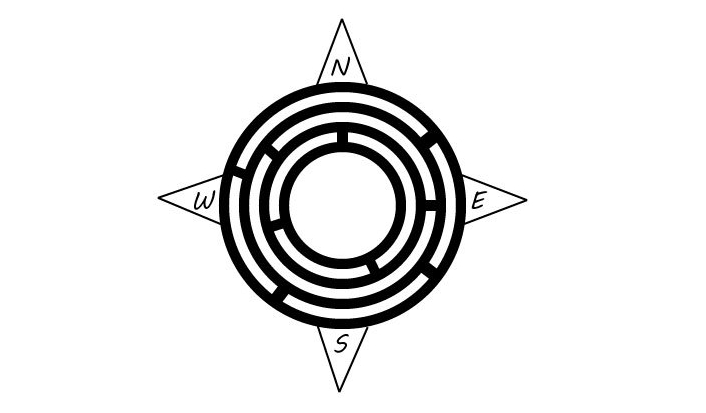
I was inspired by a lot of different things. I have been enthralled with the legend of the minotaur and the labyrinth from Greek mythology since I was very small, and labyrinths have been a big part of my life so I knew I wanted to include one. I have also been thinking about this travel blog for a long time and collecting travel logos for years that I found interesting. When I went through my collection the ones I liked most all had compasses included.

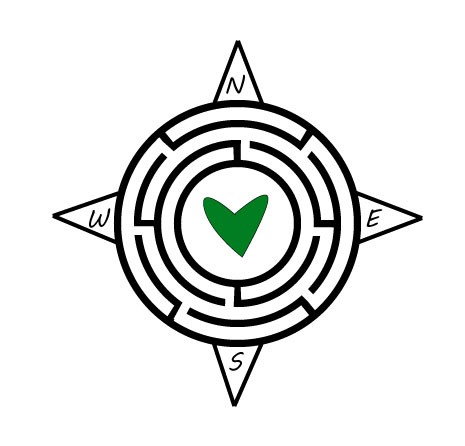
I tried to use figure-ground and negative space with the labyrinth and to create balance with the circles and the compass points on all sides. I decided not to use color or to add the actual words “Love of Lost” because I felt that the labyrinth and compass were enough, and I wanted to make it a little more minimalistic, so I stuck with black and white. I feel that while there is a lot going on, the image is scalable. It would be large, but could also look good on a small business card.

I incorporated the feedback from my classmates and teaching assistant by making the lines of the labyrinth thinner, making the lines of the compass thicker, adding a heart to the middle, and adding some color. It was suggested that I make the compass lines and the labyrinth lines the same thickness, but I felt that this actually made the compass harder to see. But I did make the thicknesses closer. I also added a heart to the middle. I decided to draw the heart myself rather than using a professional heart because I was inspired by one of my favorite street artists, James Goldcrown, who uses spray paint to create “bleeding arts” that are handmade and not perfectly shaped. You can find more information about James Goldcrown’s work here: http://www.jgoldcrown.com/bleeding-hearts. I chose to make the heart green because green is the main thematic color for my blog. I’m not sure if long term I’ll keep the green heart, as I personally prefer a more minimalistic logo, but for now I added it to try and learn from the feedback I was given. I also adjusted the placement of the labyrinth walls to make them more symmetrical, and lastly I added in the labyrinth openings that I wanted.

Technical Detail

All the elements of the logo I created myself using Adobe Illustrator. My design process included creating 4 circles, and adding lines around the circles to create a labyrinth shape. I used the line tool to create the compass points, and the font tool to add the directions. I was then able to erase some parts of the black labyrinth lines using the trim tool to create the labyrinth openings. I used the pen tool to create the heart.

Sources and Materials

Here you will find links to some of my favorite logos that helped inspire me:

Here you will find links to some of my favorite logos that helped inspire me: 1. https://www.123rf.com/photo_10976409_navigating-through-challenges-represented-by-a-labyrinth-maze-in-3d-with-a-compass-rose-symbol-showi.html?fromid=M3l6dzhudlBqaVRwMFk2SDVOb085QT09

2. https://www.pinterest.com/pin/152066924904307212/

3. https://www.pinterest.com/pin/152066924904718376/

Draft Logo Project

Idea and Inspiration

For the logo for the “Love of Lost” blog I decided to use a labyrinth as the center of a larger compass. The labyrinth is a symbol for a journey and the compass is a common symbol for travel. Both symbols are very personal to me, and I feel they are appropriate for a travel blog. I also considered using a labyrinth as the circular part of a globe instead of a compass, as the globe is also a common travel symbol, but felt that the compass better represented the concept of “lost.”


Design Process

I was inspired by a lot of different things. I have been enthralled with the legend of the minotaur and the labyrinth from Greek mythology since I was very small, and labyrinths have been a big part of my life so I knew I wanted to include one. I have also been thinking about this travel blog for a long time and collecting travel logos for years that I found interesting. When I went through my collection the ones I liked most all had compasses included.

I tried to use figure-ground and negative space with the labyrinth and to create balance with the circles and the compass points on all sides. I decided not to use color or to add the actual words “Love of Lost” because I felt that the labyrinth and compass were enough, and I wanted to make it a little more minimalistic, so I stuck with black and white. I feel that while there is a lot going on, the image is scalable. It would be large, but could also look good on a small business card.

Technical Detail

All the elements of the logo I created myself using Adobe Illustrator. My design process included creating 4 circles, and adding lines around the circles to create a labyrinth shape. I wanted to also erase portions of the black lines to create more of the labyrinth, but was not able to do this technologically, despite watching many tutorials. I am hoping to get help with this next week in class. Then I used the line tool to create the compass points, and used a font that I felt looked hand drawn, like something that would appear on a map.

Sources and Materials

Here you will find links to some of my favorite logos that helped inspire me:

Here you will find links to some of my favorite logos that helped inspire me: 1. https://www.123rf.com/photo_10976409_navigating-through-challenges-represented-by-a-labyrinth-maze-in-3d-with-a-compass-rose-symbol-showi.html?fromid=M3l6dzhudlBqaVRwMFk2SDVOb085QT09

2. https://www.pinterest.com/pin/152066924904307212/

3. https://www.pinterest.com/pin/152066924904718376/